
Steel weight: flat bar 100 x 10
At 7,850 kg/m³. Any section, length and quantity in the steel weight calculator.

Fabora Steel Tools
33 tools for the metal trades in one app, 14 of them free: steel weight, pipe offsets, bolt circles, tank volume, welding settings, cut lists and more. Every tool works with no signal, because workshops and sites do not always have one.


In English, Español, Português, Deutsch, Français, हिंदी and العربية.
Built by a working UK steel fabricator
The tools are the ones actually used on a shop floor: weights that match the section book, offsets that match the pipe, cut lists that match the saw. No account, no sign-up, and the free tools stay free.
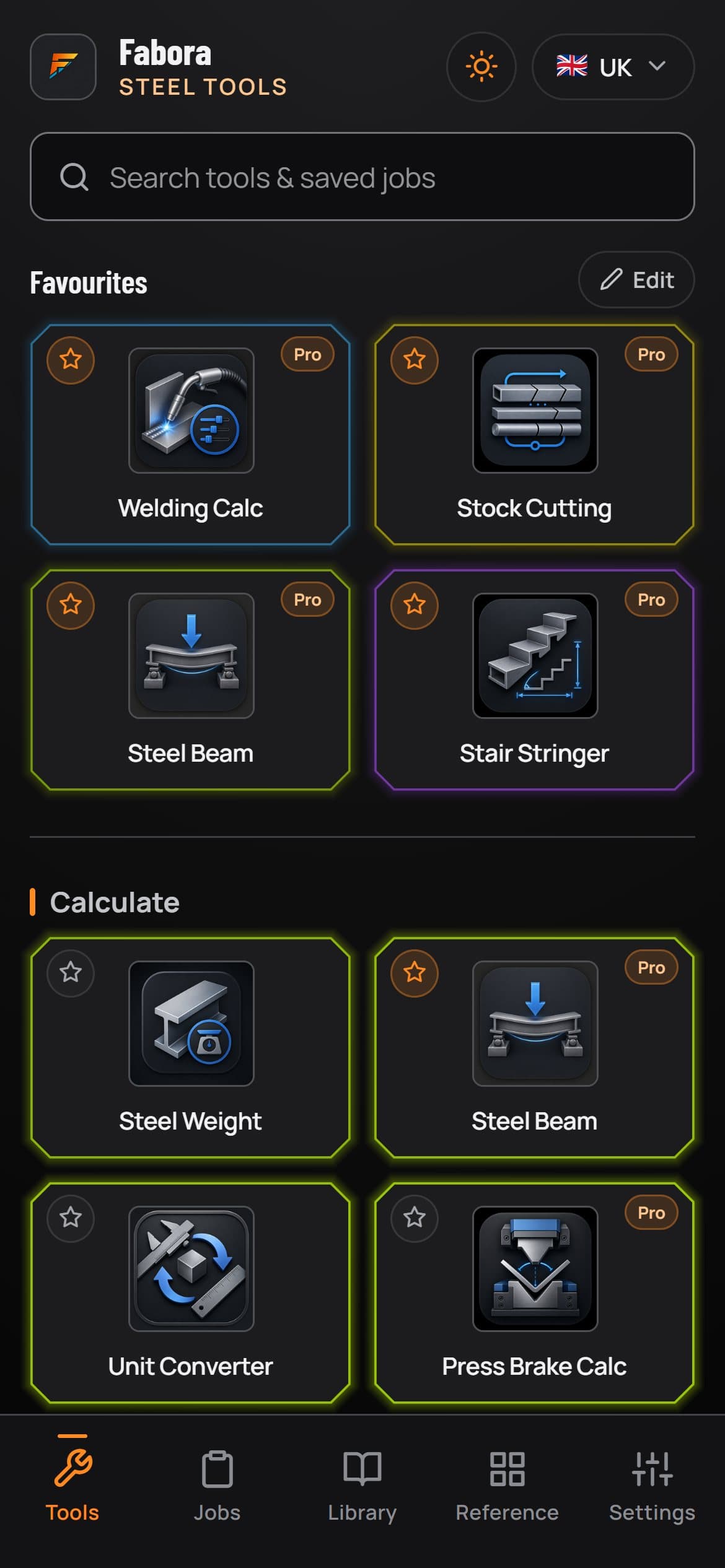
The tool grid, ready for the job
Short answer
Fabora Steel Tools is a free offline app for steel fabrication, welding and metalwork. It puts 33 calculators and reference tools on your phone: steel weight by section, pipe offsets, bolt circle spacing, tank volumes, welding settings, stock cutting, plate nesting, flat patterns, stair stringers, spiral stairs and a full UK section library.
It runs on iPhone, Android and in any web browser at tools.faboraplatform.com. 14 tools are free with no account and no sign-up, and Fabora Pro unlocks the other 19. Everything works with no signal, because the numbers are needed at the saw, the bench and the site, not back at the office.
Fabora Max, the tier above Pro, adds invoices, delivery notes and weld procedure sheets on the web and in the phone apps, and photo tools on the phone. What Fabora Max adds
Two of the calculators at work: change the length and the weight follows, and watch a cut list saw its parts. Steel Tools does the same with any section and every stock length you have.
Steel weight: flat bar 100 x 10
At 7,850 kg/m³. Any section, length and quantity in the steel weight calculator.
Cut list: one 6,000 mm length, 3 mm kerf
| Part | Length, mm | Qty |
|---|---|---|
| P1 | 1,450 | 2 |
| P2 | 2,200 | 1 |
| Offcut | 891 | 1 |
Three parts, 891 mm left over. The stock cutting optimiser works this out across every length you have.
Steel Tools is aimed at the trades that need real numbers fast, from the fabrication shop to the site gate.
Weights, cut lists, nesting, flat patterns and quotes for the work going through the shop.
Starting machine settings, gas and consumable calculators and reference charts at the bench.
Pipe offsets, cut lengths and angles worked out at the job, not back at the office.
Section weights, bolt circles and site measurements with no signal needed on site.
Quick checks on weights, beams and setting out without opening a laptop.
One toolbox on every phone in the team, with the same section data and the same answers.
Real app screens: the same calculators used on shop floors, with diagrams that match the work in front of you.
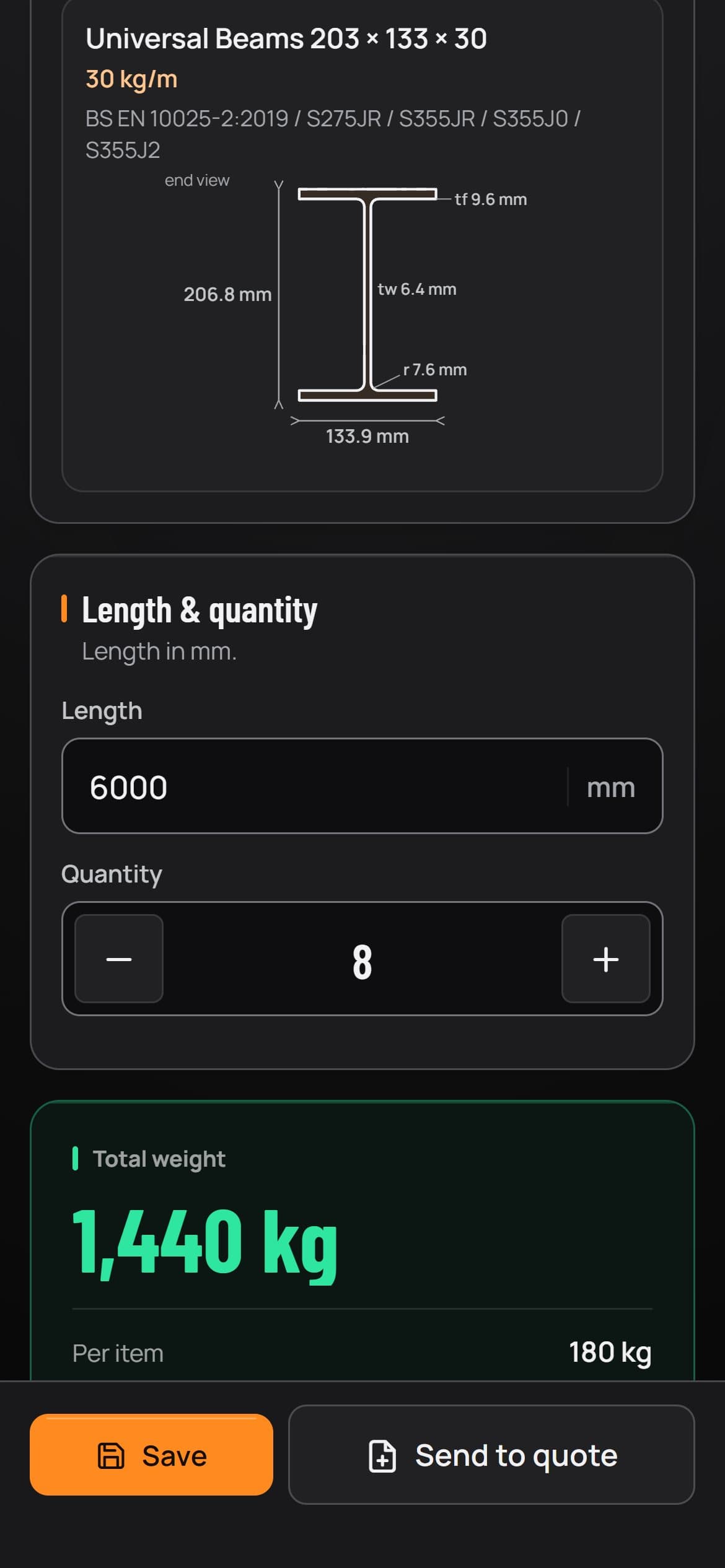
Steel weight
Pick a section from the book, such as a 203 x 133 x 30 UB, set the length and quantity, and read the total and the weight of each piece.
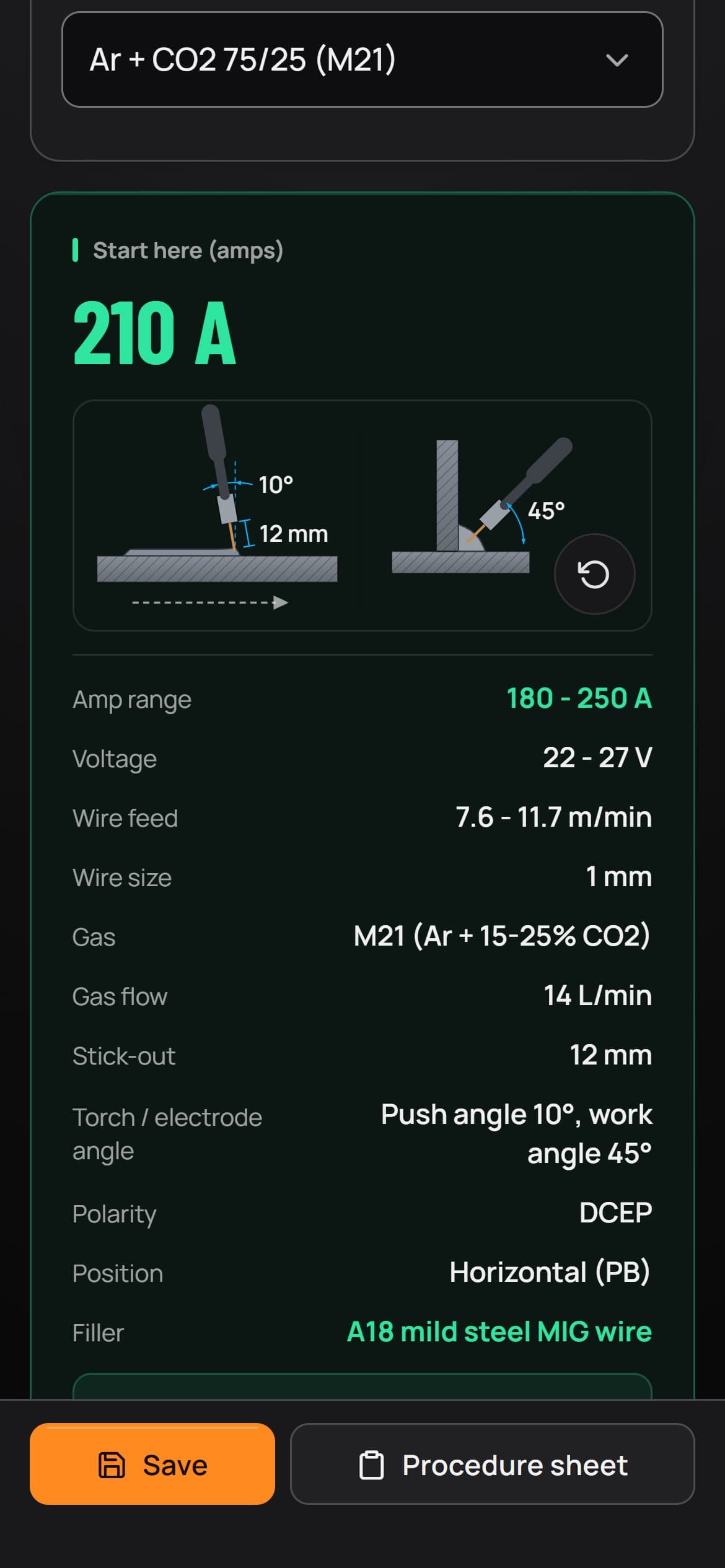
Welding settings
Get a starting current, voltage, wire feed and gas flow for the process, material and joint, with the torch angles drawn, then tune from there.
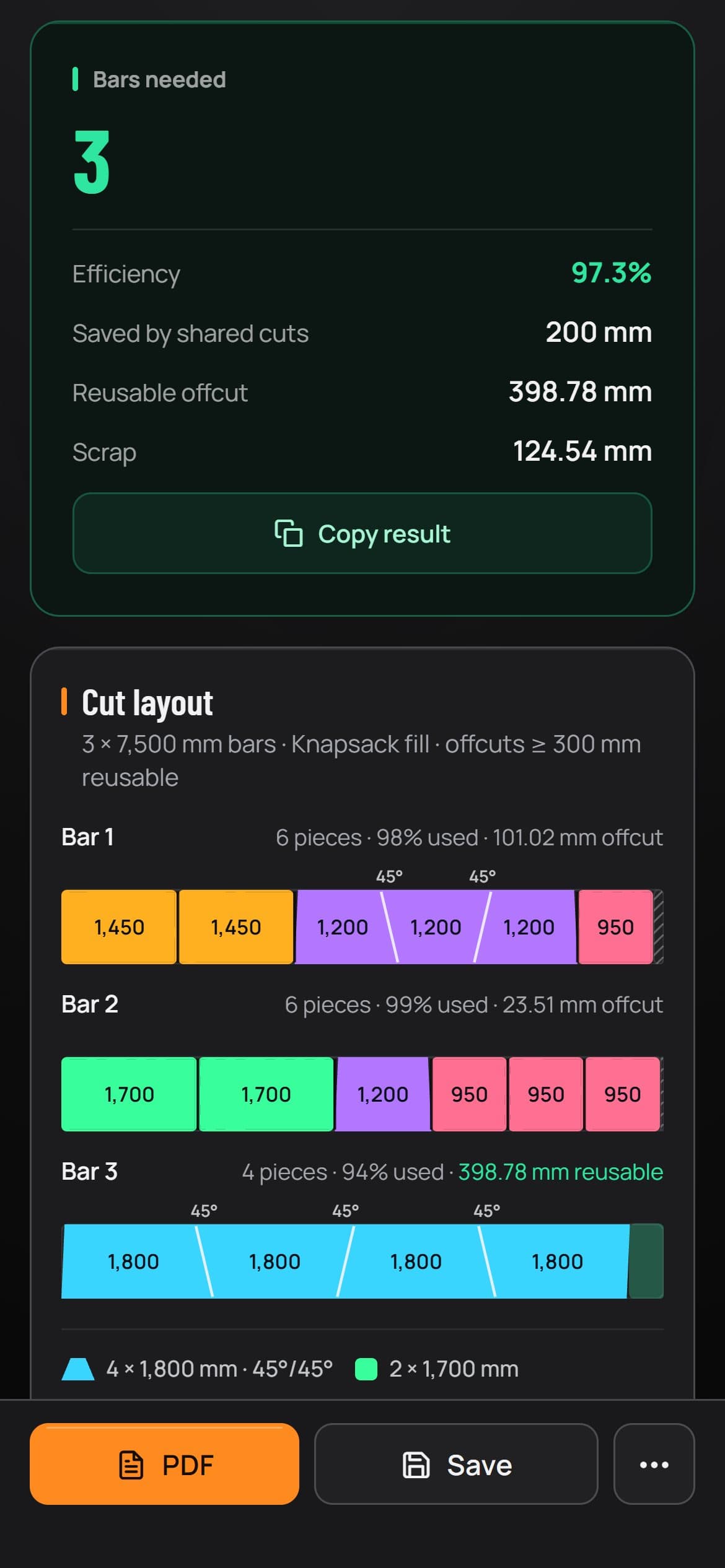
Stock cutting
Feed in the cuts and the bar length you buy, and get a plan for every bar, mitres included, with the yield and the offcut worth keeping.
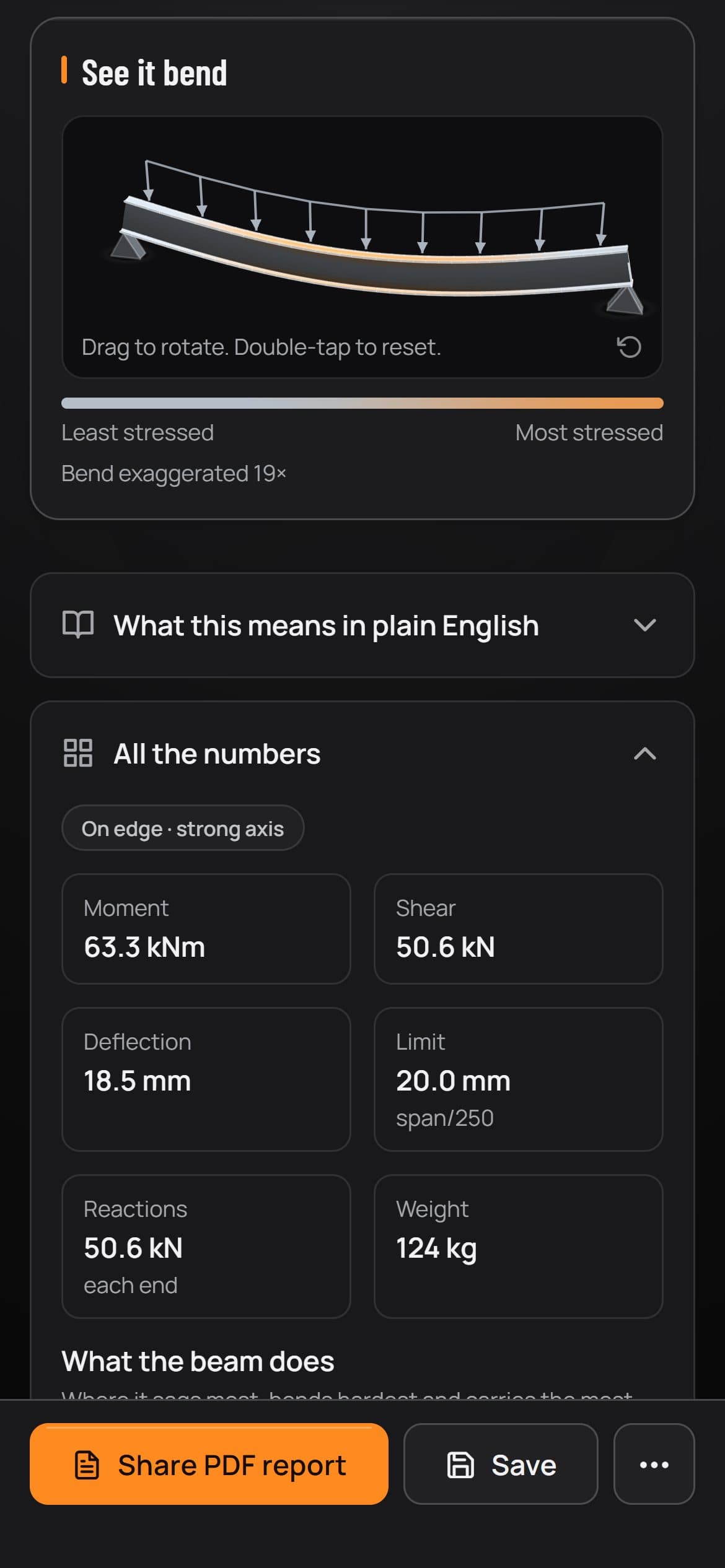
Steel beam
Set the span and the load, then turn the beam to see it bend, with moment, shear, deflection against its limit, reactions and weight.
The app follows your phone's language, or you can pick one in Settings: English, Español, Português, Deutsch, Français, हिंदी and العربية. This is the home screen in five of them.
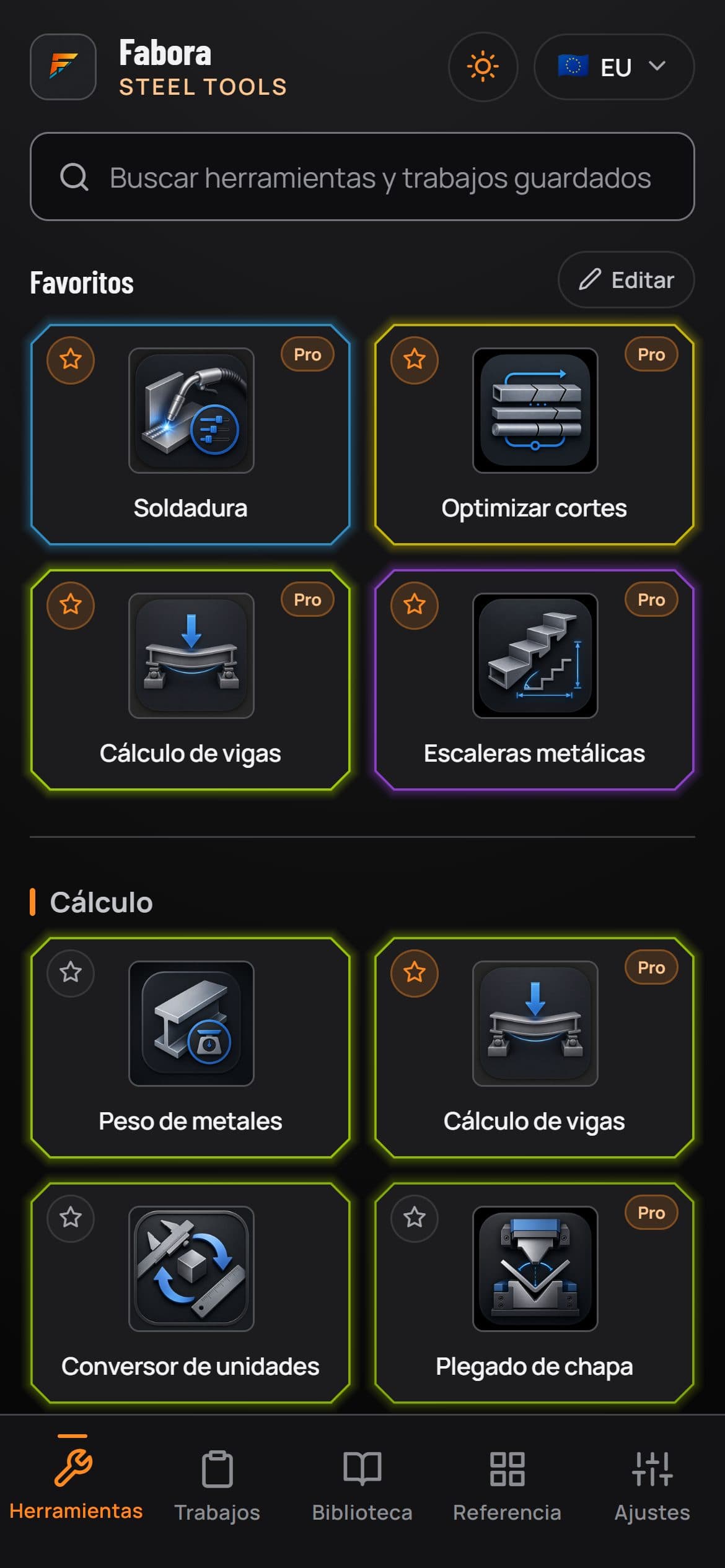
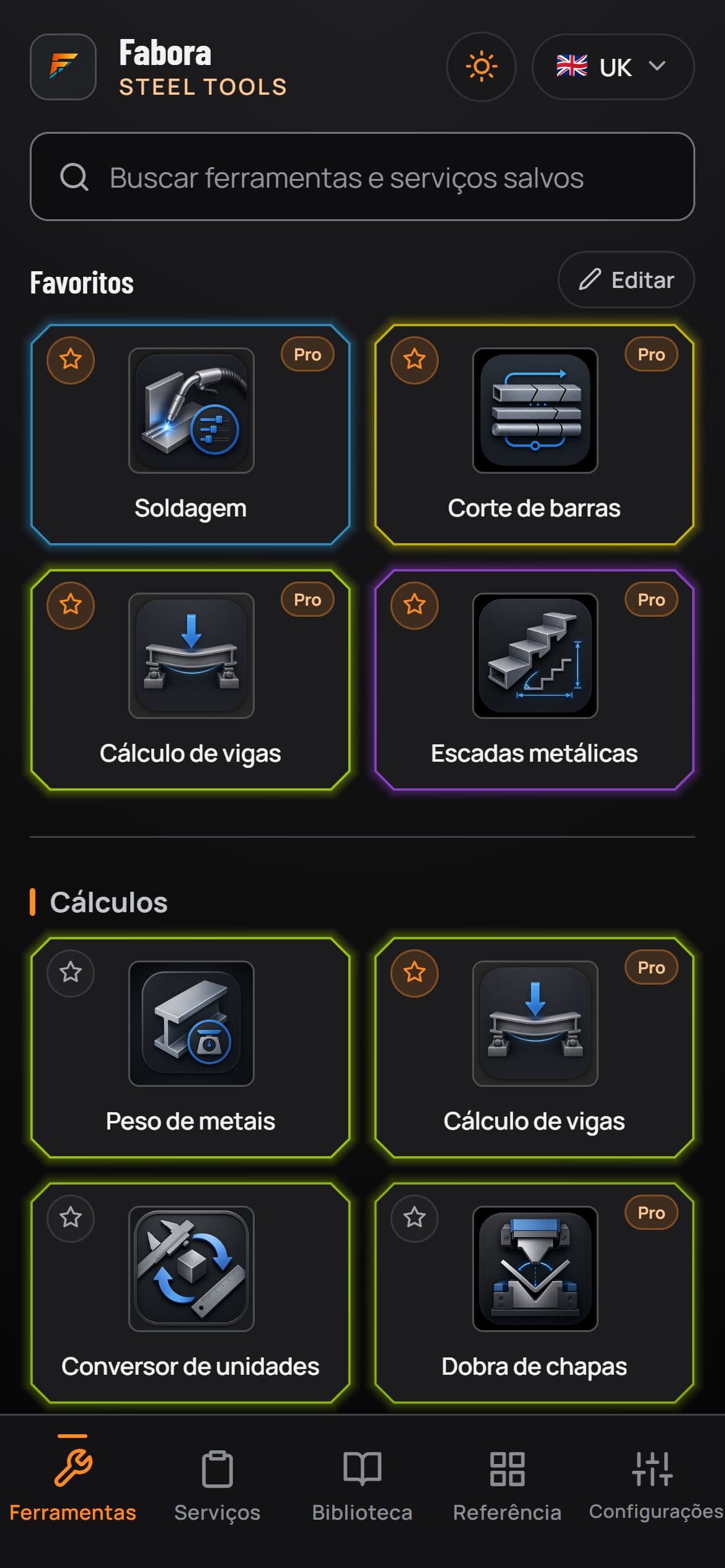
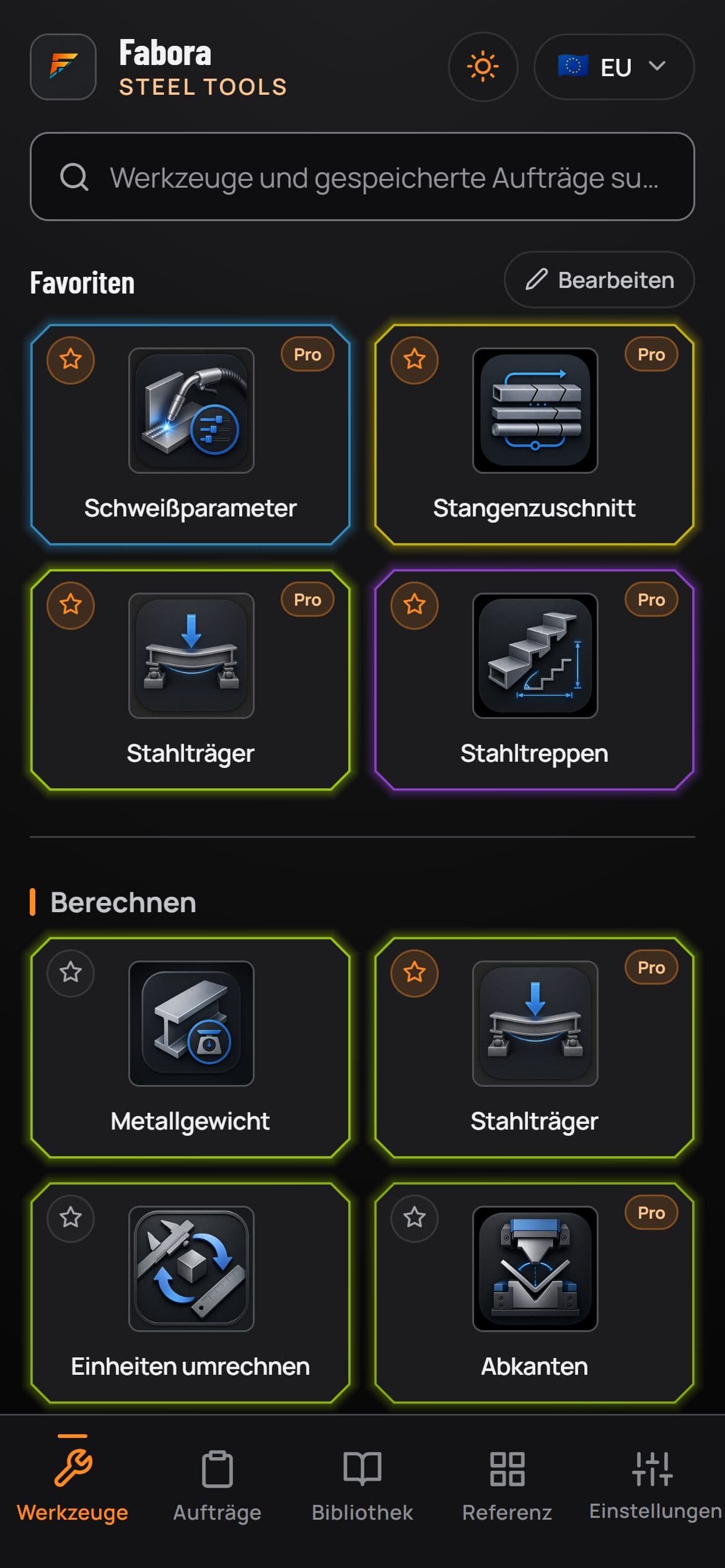
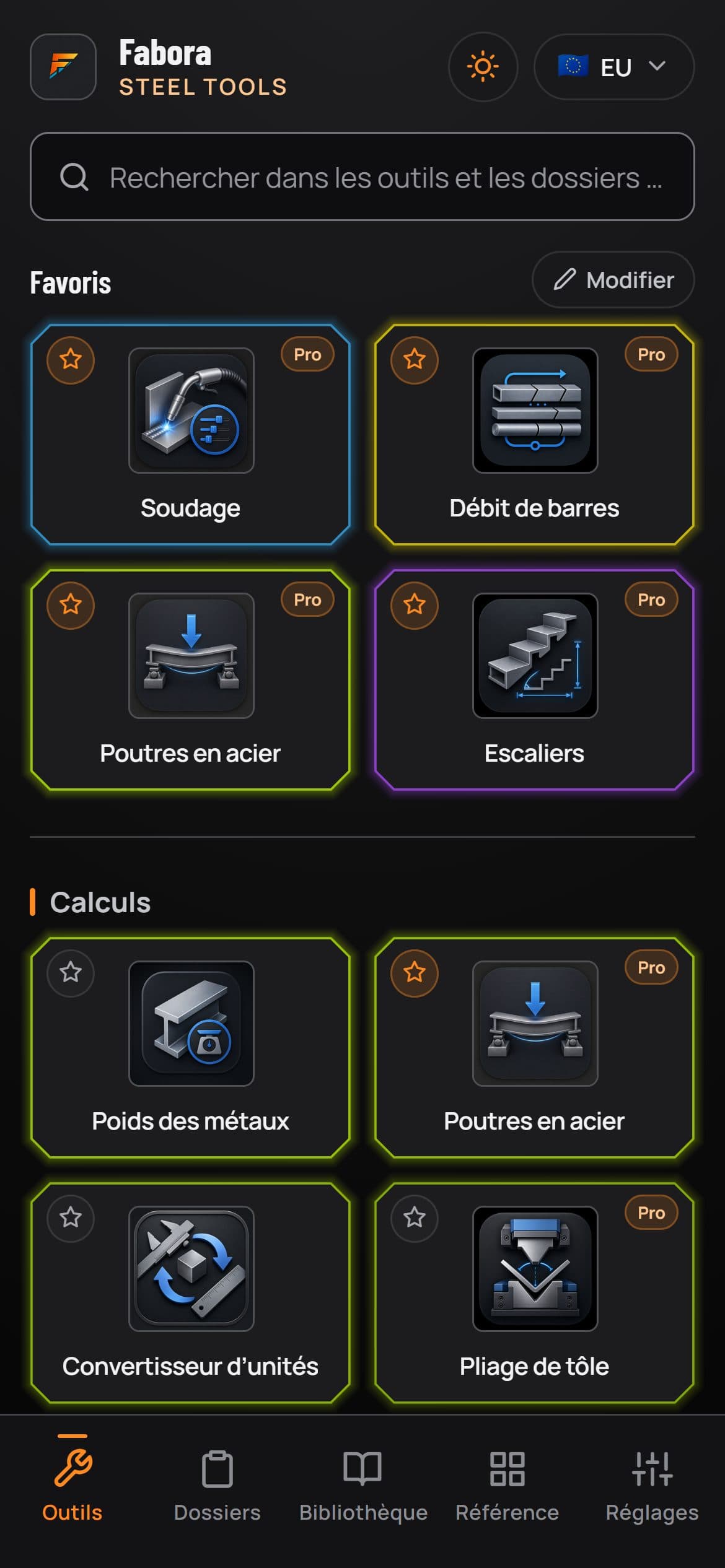
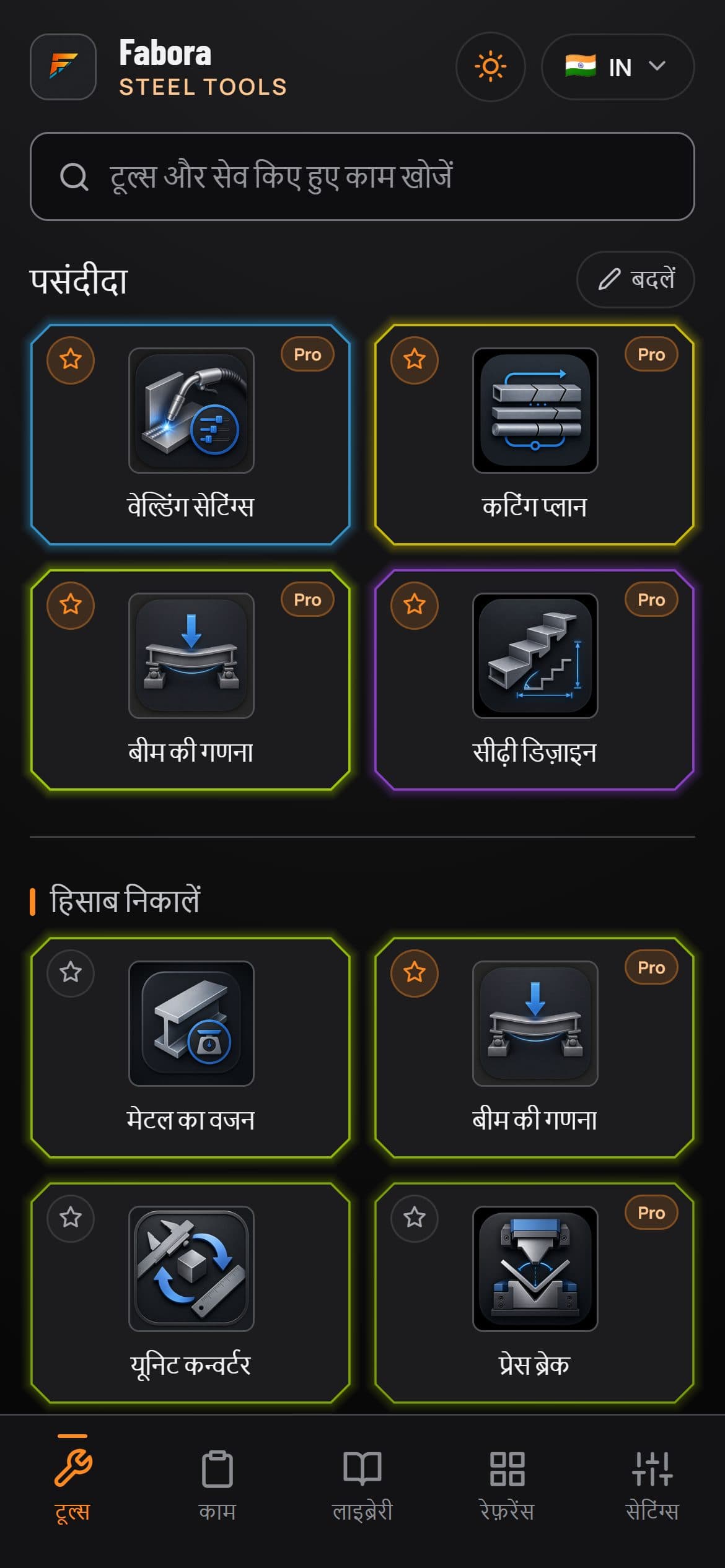
A working guide to all 33 tools in Fabora Steel Tools, plus the Tape Calculator that US settings add. Every tool runs on iPhone and Android, most run in your web browser too, and they work in metric or imperial with section data and units for the UK, US, Europe, Mexico, Australia and India. 14 are free forever, and the one marked phone only needs a camera.
The numbers a job starts with: weights, beams, folds, volumes and rebar.
The Steel Weight Calculator gives you weight, cost and surface area for plate, bar, tube and sections in mild steel, stainless or aluminium.
Use it when you're pricing a job or working out what a fabrication weighs before you order or lift it.
Covers 2,600+ UK sections plus US, EU, AU and Indian libraries, takes custom sizes and imperial fractions like 10 1/2 in, and adds price per kg or lb.
The Steel Beam Calculator sizes sections by region, giving moment, shear, deflection and weight for a chosen beam.
Use it at the planning stage to shortlist a UB or UC size before the engineer signs off the final selection.
Section properties come from published data: UK Blue Book, the US AISC shapes database, EU ArcelorMittal, plus AU and Indian tables. Compares on-edge against laid-flat.
The Unit Converter handles workshop conversions for dimensions, loads, stress, welding, weight and structural units.
Use it when a drawing lands in the wrong units and you want the numbers straight before marking out.
It's free, and it covers dimensions, loads, stress, welding, weight and structural units, so the awkward workshop conversions are all in one place.
The Tape Calculator adds, takes away, multiplies and divides feet, inches and fractions the way a tape reads.
Use it when a job is in feet and inches and you need to add up a run of cuts or split a length into equal parts.
It's free and appears on US settings, or when lengths are set to inches or feet, which makes 34 tools there, 15 of them free.
The Press Brake Calculator works out tonnage from material tensile strength, plus K-factor, flat length and bend deduction for the fold.
Use it before setting the brake, to check the machine has the tonnage and to get your flat pattern right first time.
Radius floats from the die you pick. US gauge chips run 7 ga to 14 ga, with metric kN and tonnes or US tons.
The Tank Volume Calculator gives capacity for box, cylinder and cone-bottom tanks, with flat or dished ends on the cylinder.
Use it when a customer asks what their new tank will actually hold, or what it weighs once it's full.
Results in litres and m3, contents weight for the liquid you pick, and partial fill levels so half-full has a real number too. Size a tank, which works back from a target capacity, is part of Fabora Pro.
The Rebar Calculator gives a take-off for a slab or wall: the stock bars to buy, laps, weight and cost.
Use it when a job includes a slab or wall and you need the bar order before the work starts.
The take-off is free. The cut and bend list, with cut lengths for bent bars by your region's rules, is part of Fabora Pro, and rebar sizes for every region sit in the Section Library and Steel Weight.
Settings, faults, duty cycle and gas, worked out at the machine.
The Welding Calculator gives starting amps, wire size, shielding gas and heat input for MIG, TIG, MMA (stick) and FCAW.
Most useful on a process you don't run every day, when you want a sensible starting point before striking an arc.
Works as a welding amperage chart with region-aware terms: stick in the US, MMA in the UK, same numbers either way.
The Weld Fault Finder covers 16 weld defects and machine faults: tap what you see on the weld or at the machine, and get the likely causes and the fix.
Use it when a weld comes out porous, undercut or full of spatter, or the wire bird-nests, and you want the likely cause before changing settings.
Each fault is drawn, so you can check it matches what is in front of you before you read the fix.
Weld Positions shows each plate and pipe test position being welded on screen, with the AWS and ISO codes side by side.
Use it when a test or a procedure names a position like 3G, 5G or PF and you want to see what it means before you set up.
Plate butts and fillets in all four positions, and pipe from 1G rotated to 6G at 45 degrees, each drawn as the weld goes in, with pause and replay.
Weld Joints draws fillet and butt welds as they build, with the leg, throat, bevel, root face, gap and each run from root to cap labelled.
Use it to check what a throat or leg size on a drawing means, or to show an apprentice how a multi-run butt weld fills up.
Every drawing builds on screen with pause and replay, and the Weld Fault Finder draws its faults from the same parts.
Duty Cycle & Plug Check works out how many minutes in every 10 you can weld at your amps, and whether your socket or generator can run the welder.
Use it before a long run at high amps, or before plugging a welder into a site socket or a generator.
It works from the figures on the welder's rating plate. Results are starting points, so check them against the machine's manual.
The Gas Bottle Calculator shows how long your argon, mix or CO2 lasts, the flow to set and the cost per hour.
Use it before a long job, to know whether the bottle on the trolley will see it through.
It reads the bottle size and the contents gauge, or the weight of a CO2 bottle, so a part-used bottle has a real number too.
Get more parts out of less material, and keep the leftovers working.
The Stock Cutting Optimiser turns your cut list into a bar-by-bar cutting plan with minimal offcuts and a visual layout of every bar.
Use it when a job lands with a long cut list and you need to know how many bars to pull.
It allows saw kerf on every cut, and reusable offcuts can go straight to the Offcut Store for the next job.
Plate Nesting lays your parts out on plates and sheets, showing yield percentage, plate weight, cost and a workshop layout.
Use it when you're pricing or cutting plate work and want the cheapest standard plate size that fits the job.
Kerf and part spacing follow your cutting process (plasma, laser and others), and it exports a per-plate DXF at true part size, kerf compensation left to the machine.
The Offcut Store keeps an inventory of usable plate and bar offcuts, with sizes and locations, so leftovers get used before new material is bought.
Use it before raising a material order, to check whether a drop in the rack already covers the job.
Reusable offcuts from the Stock Cutting Optimiser can be sent straight in, each logged with size and location.
True-size patterns and set-outs, from pipe runs to whole staircases.
The Pipe Offset Calculator gives travel, run and cut length for simple and rolling offsets from your offset and fitting angle.
Use it when you're setting out a pipe run around an obstruction and need the travel before you cut.
Multipliers built in for 45, 30, 22.5, 11.25, 60 and 5.625 degree fittings, plus ASME B16.9 long-radius elbow take-outs. Works in mm or inches with fractions.
Flat Pattern develops 33 shapes to flat blanks: cones, segmented bends, square to round transitions, branches, hoppers, ducting and more.
Use it when a job needs a cone, square to round or branch cut from plate and you want the blank right first time.
Develops on the mean line from material thickness, splits big cones into segments, adds lap allowance, and exports true 1:1 DXF or a tiled PDF template.
PCD / Flange Holes lays out bolt holes on a pitch circle (bolt circle in the US): chord step-off, XY coordinates and a live 1:1 drawing.
Use it when marking out flange holes on the bench and you need each centre spot on before drilling.
Standard flange lookups for PN, BS 10 and ASME B16.5, straddle or on-top first hole, optional OD and bore, DXF and PDF export.
The Arc Calculator solves a curve from any two of radius, angle, chord, rise or length, then gives set-out offsets to mark it.
Use it when a drawing gives you a chord and rise but the job needs the true radius, or the other way round.
Set-out offsets come as measurements you transfer straight to the job, and reflex angles past 180 degrees are handled.
Square Check gives the diagonals for any frame or box, how far out of square it is from the diagonals you measured, and a 3-4-5 to mark out a square corner.
Use it when a frame is tacked up and you want to know whether it is square before you weld it out.
If the diagonals you type cannot fit the sides you gave, it tells you to check your sizes instead of passing the frame.
The Triangle Calculator solves a triangle from the sides or angles you know, fills in the rest and draws it to scale.
Use it on a brace, a gusset or a raked frame, when the drawing gives two sizes and you need the third and the angles.
The solver is free. The cut list for the steel, with saw angles and long points for frames and braces, is part of Fabora Pro.
Haunch & Rafter Check marks out two haunches from one bar and checks a portal frame drawing's set-backs, lengths and end cuts.
Use it before you cut a haunch, to find out whether the figures on the drawing agree with each other.
Each figure from the drawing gets a verdict of matches, rounded or out, and a 3D view shows the haunch, rafter and end plate together.
The Baluster & Divider Calculator gives even spacing for pickets, cross members and dividers, with clear gaps and centre-to-centre pitch worked out for you.
Reach for it on gates and balustrades, any time every gap has to come out equal.
It also produces a shop mark-out list, so the spacing goes from screen to steel without re-working the numbers.
Stair Stringer Designer sets out straight-flight stairs and steel stringers, checked against the building rules for your region.
Use it when quoting or fabricating a staircase and the set-out has to sit within the rules before you cut steel.
Covers UK per-nation guidance, US feet and inches, AU and EU limits, rest landings, closed-plate or sawtooth stringers, and exports a DXF per flight plus a set-out PDF.
The Spiral Stair Designer sets out a spiral stair round a centre column, with helical handrails, and checks it against the rules for your region.
Use it when quoting or making a spiral stair, to get the treads, headroom and handrail right before you order the column.
It gives rolling data for the handrail, a cut list, and DXF and PDF exports. A rule it could not confirm shows as not checked, never as a pass.
The Cat Ladder Designer sets out cat ladders and ship ladders: rung set-out, the cage, drawings, a cut list and a PDF.
Use it when quoting or making a fixed access ladder and the rungs, cage and rest platforms have to come out right before you cut steel.
Checked against selected rules for six regions; where a region has none, it uses borrowed UK or European practice and says so. A pass is a planning check, not a certificate.
Turn the numbers into a price a customer can say yes to.
Price Sheet & Quote costs a job from labour and material lines, adds markup and VAT or sales tax, then generates a branded quote PDF.
Use it to get an enquiry priced, labour, steel and markup included, with a quote out the same day.
Stock lines pull weights from the section library. Nesting, cutting and weight results drop straight into a quote, and saved quotes reopen for re-issue.
The Quote Book lists every quote by month, marked won or lost, with the quoted value, win rate and profit.
Use it at the end of a month to see which work you are winning and what it is making.
A lost quote can keep a note of what the job went for, ready for the next time you price similar work.
The data and checks you reach for between calculations.
The Section Library holds 2,600+ UK sections with weights and dimensions: UB, UC, PFC, SHS, RHS, CHS, angles, flats, bars, plus stainless and aluminium stock.
Use it when you're quoting and need a section weight or dimension without digging through tables.
Full profile data (web, flange, root radius) with BS EN designations, plus US, EU, AU and Indian libraries. One tap sends any section to the Steel Weight Calculator.
Photo Markup lets you take a site photo and add measurements, arrows and notes straight onto it.
Use it on a site survey, so the dimensions you took come home attached to the photo instead of scribbled on a scrap.
Marked-up photos save to the job. Phone only, because it needs the camera.
The Colour Matcher reads a photo of a painted part and matches it to the nearest RAL or BS standard colour.
Use it when a repair or extension has to match existing paintwork and nobody kept a record of the original spec.
Take the photo on your phone, or choose one from your computer in the web version; the RAL and BS colour reference itself is browsable without a photo.
Screen Ruler & Bolt Gauge puts a calibrated mm and inch ruler on your screen, plus a bolt gauge to identify bolts and washers.
Use it when an odd bolt lands on the bench and you need to size it without hunting for the callipers.
Calibrated once against a bank card; works on a phone screen or a desktop monitor.
The Angle Finder gives you a live angle readout and bubble level from your phone's motion sensor, plus a camera protractor.
Use it to check a mitre before you cut, or read the pitch of an existing frame you're matching.
Photo measure and mitre helper modes work on the web too: import a photo, click points, read the angle.
Fabora Max is the business tier above Fabora Pro. It includes all 33 tools and everything in Pro, then adds the paperwork and photo tools below. It is £9.99 a month or £79.99 a year in the UK, with no free trial, on the web and in the iPhone and Android apps in the UK, Ireland, the US, Canada, Australia and New Zealand.
Turn a saved quote into an invoice, or start one from scratch. It numbers each invoice, sets the due date, works out the VAT or GST, tracks paid and unpaid and flags overdue ones. The PDF carries your logo, bank details and a pay link, and there is a reverse charge option for UK and Irish work.
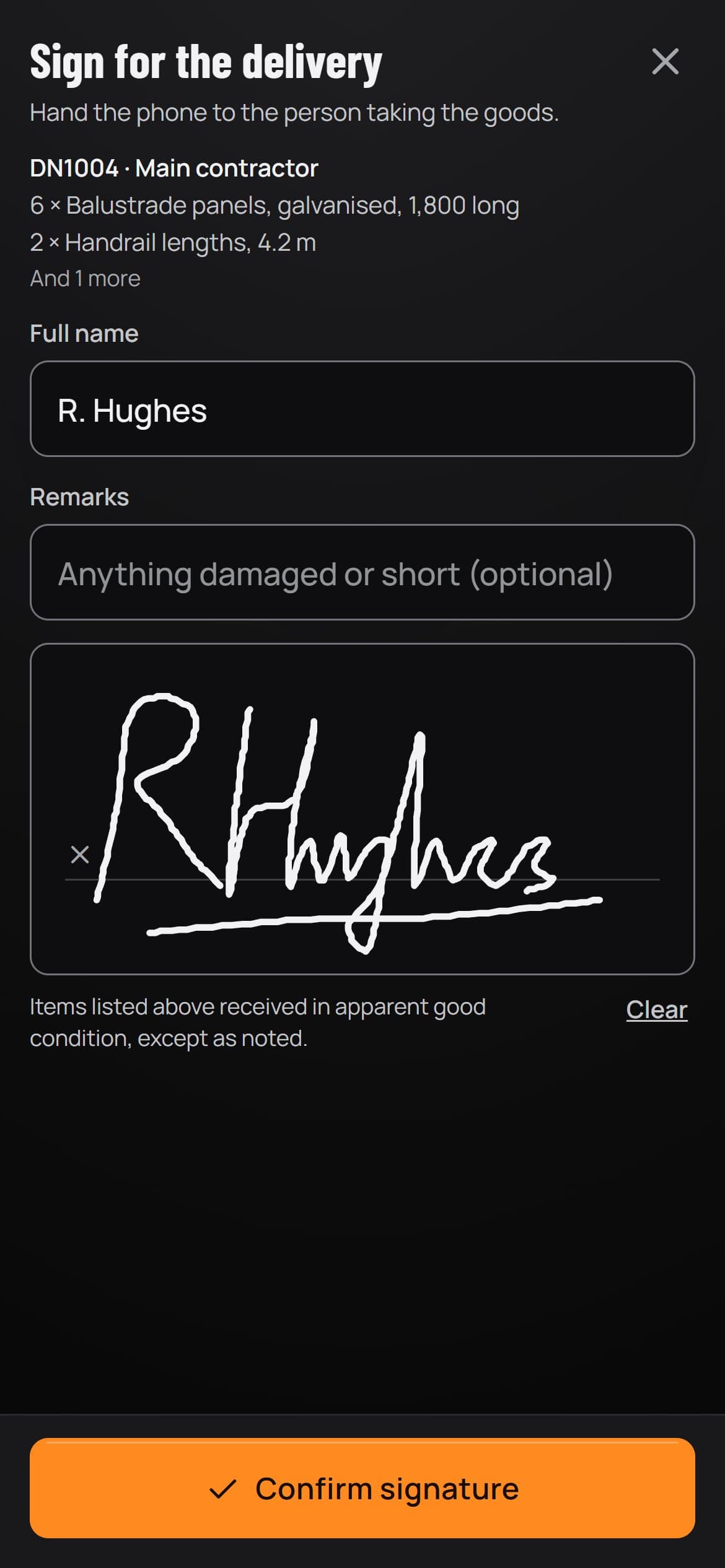
Have the customer sign the delivery note on your phone when you drop the work off, with the time stamped and a photo if you want one. It links to the quote and invoice for the same job.
Save your Welding Calculator settings as a procedure sheet, ready to print. Every sheet is marked draft until a qualified procedure (a WPQR or PQR) backs it.
Plans EN ISO 9606-1 welder tests: the fewest test pieces to code a welder for the work, with a pWPS started for each, and the passed certificates kept with a photo and a reminder before the next date. It shows on settings that use EN ISO welding standards, so not on US settings.
Bring DXF parts into Plate Nesting, holes and all, and nest them on your plates and sheets with the rest of the job.
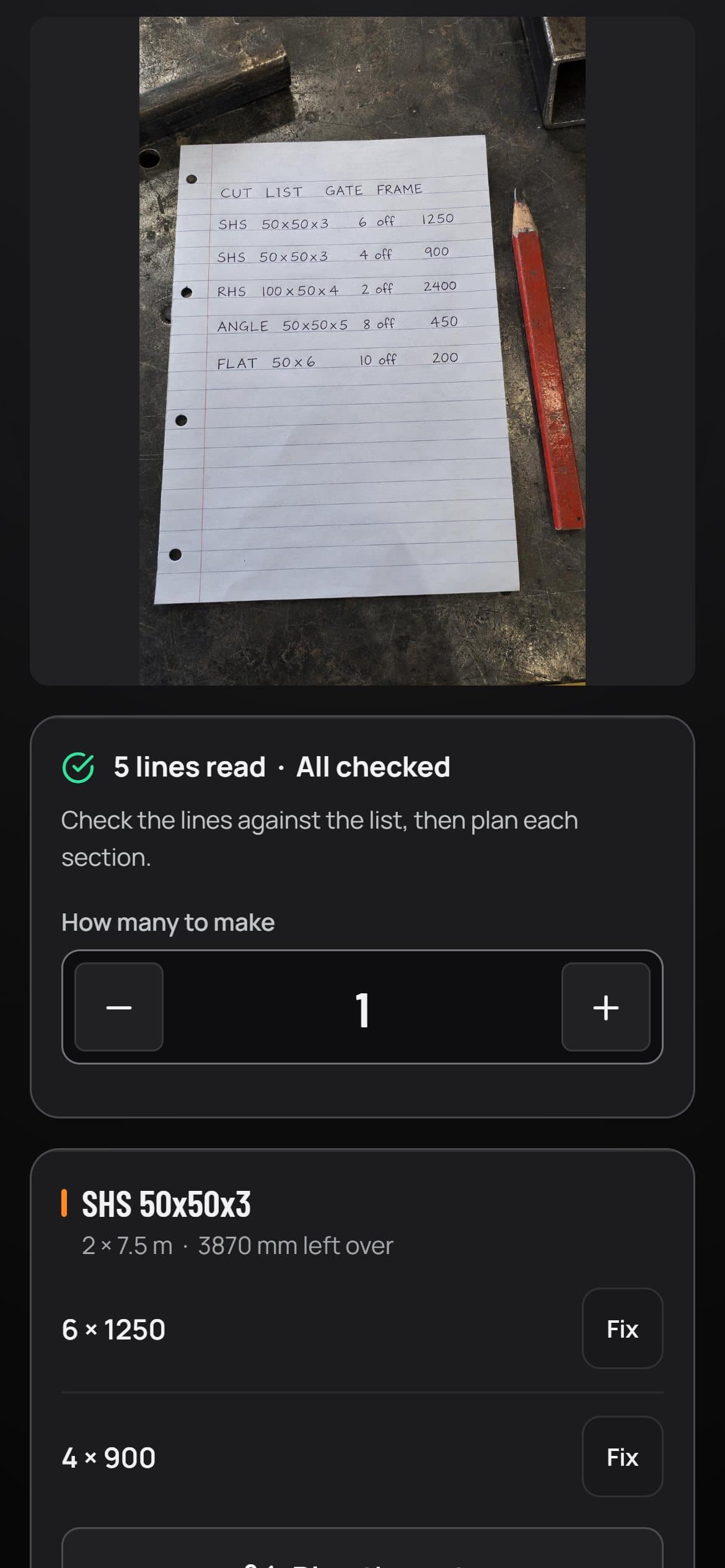
Drawing Check reads a photo of a shop drawing into a parts list and flags dimensions that do not add up. The parts list reader turns a photo of a written or printed cut list into lines in Stock Cutting. Goods In Count counts each shape and size from a photo of the ends of a delivery, to check against the order. Up to 100 photo reads a month across all three.
Fabora Max
Hand the phone over at the drop. The customer signs, adds any remarks, and the note keeps the time.
Fabora Max
Photograph a handwritten or printed list. Each line is read for you to check, then planned in Stock Cutting.
The photo tools are in the phone apps and need a signal: each photo is sent to a third-party service to be read, and Fabora keeps no photo or reading, apart from the Goods In Count photos and counts you choose to share to help it learn. Check every reading before you cut or sign. The other Max tools also run in the browser and work offline like the rest of the app.
14 tools are free with no account, no sign-up and no card. Fabora Pro unlocks the other 19 and every export, on the web or through the App Store or Google Play, where new subscribers get a 7-day free trial. Fabora Max adds invoices, delivery notes and procedure sheets on the web and in the phone apps, plus photo tools on the phone.
Free
£0, no sign-up
Free forever, no account needed
Fabora Pro
£4.99/month
Or £39.99/year, the best value
Subscribe on the web, billed securely by card, or through the App Store or Google Play, where new subscribers get a 7-day free trial. Cancel anytime either way. The price shown is the UK one; the web and the phone apps show yours before you pay.
Fabora Max
£9.99/month
Or £79.99/year, no free trial
On the web and in the iPhone and Android apps in the UK, Ireland, the US, Canada, Australia and New Zealand. The price shown is the UK one; the web and the phone apps show yours before you pay. The photo tools are in the phone apps. What Max adds
iPhone, Android and any web browser. Same tools, same prices, wherever you are working.
Live now
Most of the app runs in any browser on PC, Mac or phone at tools.faboraplatform.com, free tools included and the rest with Fabora Pro, plus the Fabora Max office tools, and it keeps working offline once you have opened it.
Live now
On the App Store now. 14 free tools, Fabora Pro with a 7-day free trial for the full set, and Fabora Max in six countries.
On Google Play
The Android version is on Google Play now, with the same tools, free tier, Fabora Pro and Fabora Max as the iPhone app.
Practical answers on the free tier, Fabora Pro pricing, offline use and where the app runs.
Fabora Steel Tools is an app for iPhone and Android, with most tools also in any web browser, that has 33 calculators and reference tools for steel fabrication, welding and metalwork: steel weight, pipe offsets, bolt circles, tank volume, welding settings, stock cutting, plate nesting, flat patterns, stairs and more. It was built by a working UK steel fabricator, so the tools are the ones actually used on a shop floor.
14 tools are completely free with no account, no sign-up and no card: steel weight, unit converter, tank volume, rebar take-off, weld fault finder, weld positions, weld joints, duty cycle and plug check, gas bottle, triangle calculator, square check, section library, screen ruler and angle finder. US settings add a free Tape Calculator as well. Fabora Pro unlocks the other 19 tools, Size a tank in the Tank Volume Calculator, the rebar cut and bend list, the triangle cut list and every export.
Fabora Pro is £4.99 a month or £39.99 a year in the UK. In Ireland it is €5.99 a month or €49.99 a year, in the US $5.99 or $47.99, in Canada C$6.99 or C$49.99, in Australia A$8.99 or A$69.99, and in New Zealand NZ$9.99 or NZ$69.99. The web charges the same as the App Store and Google Play in each of these countries. Those were the prices on 27 October 2026; in other countries, and if a price changes, you see yours before you pay. On the web you pay by card and can cancel anytime from the link in your receipt email. Through the App Store or Google Play, new subscribers get a 7-day free trial and billing is handled by Apple or Google.
Fabora Max is the business tier of Fabora Steel Tools, one level above Fabora Pro. It includes everything in Pro and adds invoices, signed delivery notes, weld procedure sheets, the Welder Test Planner for EN ISO 9606-1 welder tests, DXF import into Plate Nesting, and three photo tools: Drawing Check, the parts list reader in Stock Cutting and Goods In Count, with up to 100 photo reads a month.
Fabora Max is £9.99 a month or £79.99 a year in the UK, with no free trial. In Ireland it is €11.99 a month or €99.99 a year, in the US $11.99 or $95.99, in Canada C$13.99 or C$99.99, in Australia A$17.99 or A$139.99, and in New Zealand NZ$19.99 or NZ$139.99. The web charges the same as the App Store and Google Play in each of these countries. Those were the prices on 27 October 2026, and you see the current price before you pay.
On the web at tools.faboraplatform.com and in the Fabora Steel Tools app for iPhone and Android, in the UK, Ireland, the US, Canada, Australia and New Zealand. It isn't offered in other countries. On the web you get the office tools: invoices, delivery notes, weld procedure sheets, welder tests and DXF import. The photo tools are in the iPhone and Android apps.
Yes. Every one of the 33 tools works fully offline with no signal, which is the whole point: workshops and sites do not always have a connection, and the numbers are needed there, not back at the office. The Fabora Max photo tools are the exception: they need a signal, because each photo is sent away to be read.
Fabora Steel Tools is in English, Spanish (Español, with a version for Mexico), Portuguese (Português, for Portugal and for Brazil), German (Deutsch), French (Français), Hindi (हिंदी) and Arabic (العربية). It follows your phone's language, and you can pick another one in Settings.
Both are live. The iPhone version is on the App Store and the Android version is on Google Play, with the same free tools and the same Fabora Pro prices.
Yes. Steel Tools runs in any web browser at tools.faboraplatform.com, with a free tier and the same Fabora Pro prices as the phone apps. It works offline once opened, and Photo Markup stays phone-only because a desktop cannot point a camera at the work.
Most of them, with the same Fabora Pro prices. Photo Markup stays on the phone because a desktop cannot point a camera at the work. The Colour Matcher works on a computer from a photo you choose. The Angle Finder's live sensor modes also need a phone; its photo measure and mitre helper modes work anywhere. Fabora Max's office tools are on the web too, but its photo tools are phone only, and new tools can reach the phone apps before the web version.
No. Steel Tools has no accounts, no sign-up and no passwords, on iPhone, Android or the web. On the web, Fabora Pro stays unlocked in the browser you subscribed in, so there is nothing to sign into on your next visit. Settings gives you a recovery link for moving to another device, and your receipt email carries a manage link for billing.
Open Settings in the browser where you subscribed, copy the recovery link, and open that link on the other computer. Your subscription unlocks there without any sign-in, because there is no account behind it. Treat the link like a key, since anyone who opens it gets access. Your saved work stays in the browser it was made in, so to take it with you, choose Back up my work in Settings and then Restore a backup on the other computer. If you subscribed in the phone app, open Settings on the computer and choose Sign in with your phone, then scan the code from Settings, Use Pro on a computer in the app (version 1.0.16 or later). If you lose the link, email info@faboraplatform.com and we will sort it out.
On the web, open the manage link in any Steel Tools receipt email and cancel in the customer portal; there is no phone call, no account and no notice period. Through the App Store, cancel in your Apple subscription settings, and through Google Play, in the Play Store under Payments and subscriptions. Either way you keep access until the end of the period you have paid for, and the 14 free tools keep working forever.
Yes. Fabora Pro exports true 1:1 DXF and PDF cut files from the flat pattern developer, the PCD and flange hole layout, plate nesting and the stair stringer designer, ready for a plasma, laser or profile cutter. The DXF carries the true part size, with kerf compensation left to the machine, and exports work the same on the web, iPhone and Android. Fabora Max also imports DXF parts into Plate Nesting.
No. Results are estimates based on the values entered. Always check dimensions, material data and supplier information before ordering, fabricating or lifting, and keep structural decisions with a competent engineer.
Steel Tools is made by Fabora, and it was built by a working UK steel fabricator. Fabora also makes Fabora RAMS and LEV Ready for UK steelwork and workshop teams.
14 tools free forever, no account. Use it right now in your browser, or download it free from the App Store or Google Play, where a 7-day free trial covers the full set of 33.
In English, Español, Português, Deutsch, Français, हिंदी and العربية.